
Engineering the Agentic Era: A System Pilot Playbook for 2026
A Deep Dive into Google Antigravity, Claude Code, and the BLAST-OODA Methodology

Executive Summary
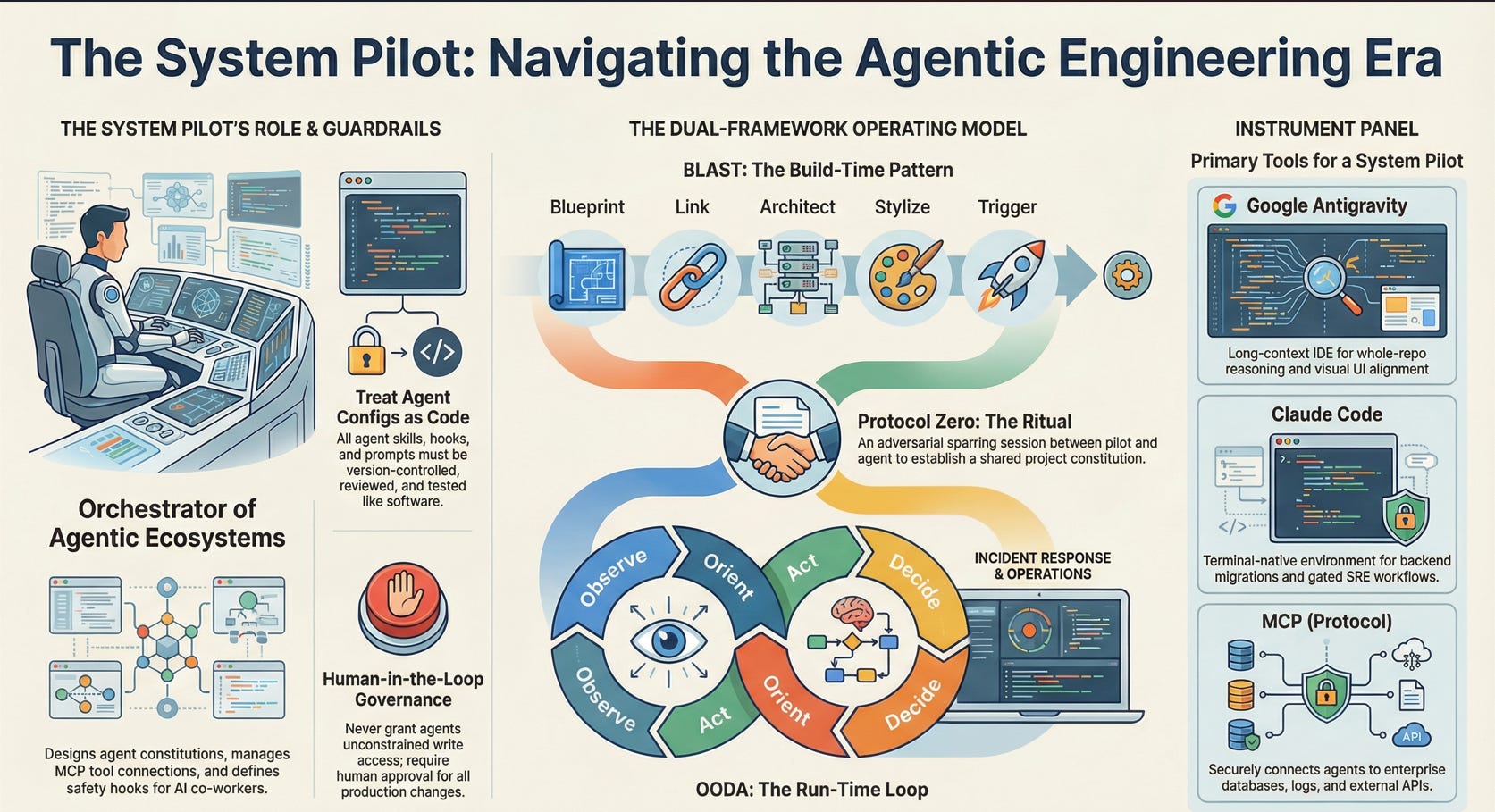
This guide proposes the System Pilot as a new engineering role for the “agentic era”: the person who designs, configures, and governs AI agents that work inside IDEs (Google Antigravity), terminals (Claude Code), and tool fabrics (MCP) to help build and operate software. Rather than replacing developers or SREs, System Pilots turn agents into reliable co-workers by combining long-context models, multi-agent orchestration, and secure tool access with tests, diffs, and human review.
The core problem it addresses is that today’s agentic tools are powerful but brittle: they can read and modify large codebases, call databases and APIs, and even respond to incidents, but without clear constraints they create new risks around security, cost, and reliability. The guide shows how to reduce that risk by treating agent configurations, Skills, hooks, and MCP connections as first-class engineering assets: they live in version control, are reviewed like code, and are wired into CI/CD and observability.
The proposed operating model has three pillars:
Two complementary cockpits
Google Antigravity as an agent-first IDE that leverages Gemini 3.x Pro’s long context to support whole-repo reasoning, UI alignment, and multi-agent workflows with isolated “ghost runtimes.”
Claude Code as a terminal-native environment with Agent Teams and event-driven hooks, optimized for deeply reasoned backend changes, migrations, and SRE workflows that require strict gating and review.
A secure connection layer
MCP (Model Context Protocol) as the standard way to connect agents to databases, logs, and external services, upgraded by the November 2025 spec (CIMD, XAA, async tasks) to support enterprise-grade identity, authorization, and long-running workflows.
MCP servers hold credentials and enforce scopes; hosts (Antigravity, Claude Code) act as clients that can only do what the MCP layer allows, under policy and audit.
Two complementary frameworks
BLAST (Blueprint, Link, Architect, Stylize, Trigger), originally articulated by Jack Roberts, as the build-time pattern for taking a product from idea to production: define a constitution and risks, connect tools, orchestrate agent teams for implementation, align UI, and deploy with a cleanup pass.
OODA (Observe, Orient, Decide, Act) as the run-time loop for using agents in production operations: they observe telemetry, help orient on root cause, propose and sometimes execute mitigations under human-defined hooks, and feed lessons back into constitutions and tests.
Across both build and run phases, the guide recommends a set of “Golden Rules”: treat agent configs and Skills as code, never grant unconstrained write access to production, keep secrets in MCP servers or vaults, require PRs and CI for all agent-generated changes, and track token usage with explicit budgets. A concrete Next.js + Supabase + Stripe SaaS example illustrates how to apply these rules: from initializing .claude and .antigravity configs and gemini.md, to wiring MCP servers for staging and prod, to using Agent Teams and Antigravity Skills to build features, and finally to handling a realistic billing incident via an agent-assisted OODA loop.
For executives and technical leaders, the key recommendation is not to “let agents code everything,” but to establish System Pilots—engineers who own constitutions, hooks, and MCP integrations—and to align these with platform, SRE, and security teams. Done well, organizations can get faster delivery and more resilient operations from Antigravity, Claude Code, and MCP, while keeping humans firmly in control of safety, cost, and architectural direction.
This is a long-form guide intended as a reference you can skim by role rather than a quick blog post. Use the path pointers below to jump to what matters most to you.
0. Who This Is For (Pick Your Path)
Choose the path closest to your reality before diving in.
Path A – Solo founder / small product team
You’re building or iterating on a SaaS (e.g., a Next.js app with Stripe and Postgres) and want agents to accelerate feature work, UI polish, and basic operations.
Path B – Infra / SRE / Platform engineer
You’re responsible for uptime and incidents. You’re interested in Claude Code Agent Teams, MCP-connected logs/metrics, and agent-assisted incident response.
Path C – Architect / Tech lead in a mid–large org
You care about governance: how agents access repositories, databases, and internal tools, and how to keep them inside your security and compliance fences.
How to use this guide
If you’re mostly Path A, focus on sections 0–5 and 8 (initialization, cockpits, memory, BLAST). If you’re Path B, prioritize 6, 8, and 10 (memory, incidents/OODA, economics). If you’re Path C, read 2, 3, 7, and 11 (role, mappings, MCP, ownership), and skim the rest as needed for context. BLAST is the framework we’ll use for build-time workflows; OODA is the loop we’ll use for run-time operations and incident handling.
We’ll anchor concepts to a concrete running example:
A small AI SaaS: a Next.js app with Tailwind + shadcn/ui, Supabase Postgres, and Stripe billing. You want agents involved from first commit to production and operations.
1. Where We Really Are in 2026
Antigravity, Claude Code Agent Teams, and MCP are powerful and evolving, but they’re not “press button, ship unicorn” tools.
Google’s Gemini 3.x Pro models offer long context (≈1M tokens, with variants up to 2M), better tool use, and strong reasoning, and Antigravity is designed to exploit those capabilities in an IDE.
Claude Code’s Agent Teams can coordinate multiple Claude instances in parallel with hooks that enforce quality gates.
The November 2025 MCP spec update (CIMD, XAA, async tasks, extensions) makes MCP far more enterprise-ready, but secure deployments still require careful design and ownership.
You are not replacing engineers; you are equipping them—and yourself—with agent workflows that can safely absorb more of the mechanical work under constraints you define.
2. The System Pilot: Role and Golden Rules
A System Pilot is the person who designs and operates the agent ecosystem for a project or product.
You’re responsible for:
Constitutions: documents and configs that define what agents can do and what they must not.
Environments: IDE/CLI configs (Antigravity, Claude Code), MCP connections, and CI/CD paths.
Guardrails: hooks, tests, approvals, token budgets, and escalation rules.
Education: helping others on the team understand how to use agents safely.
2.1 Golden Rules for System Pilots
These rules apply regardless of your path.
Treat constitutions, Skills, hooks, and MCP configs as code: version them, review them, and test them.
Never give an agent unconstrained write access to production: require tests, hooks, and explicit human-in-the-loop approval.
Keep secrets and credentials in MCP servers or secret managers, not in
.claude,.antigravity, or repo files.Require PRs and CI for all agent-generated changes, even “trivial” ones.
Track token usage per project and per environment; set budgets and alerts.
Start with read-only and sandbox MCP tools; progressively grant writes as you add guardrails.
3. How Key Concepts Map to Tools
A quick reference table for the major concepts in this playbook.
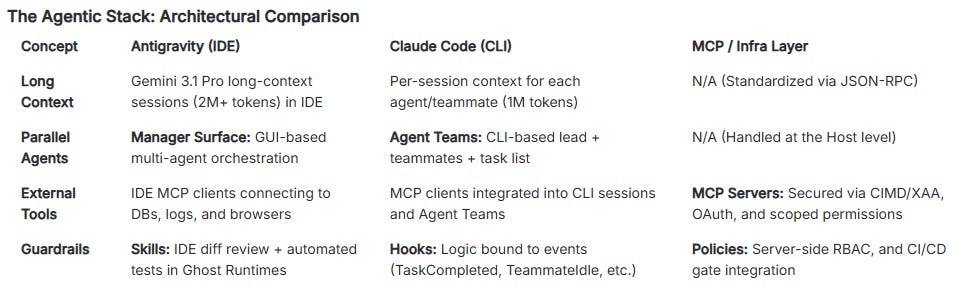
Keep this mapping in mind as we walk through the lifecycle.
4. First Flight: Initializing a New Repo
We’ll apply this to the Next.js + Supabase + Stripe SaaS example.
4.1 Genesis Commands
In a fresh repo:
Initialize Claude Code:
claude-code init
Initialize Antigravity configuration:
antigravity setup(or equivalent in the current Antigravity release).
Then, in your chosen cockpit, issue a Protocol Zero prompt:
“Initialize as System-Pilot-Skill-Architect for this Next.js SaaS. Audit this directory and propose
.claude,.antigravity(or.agent), and MCP configuration. Draftgemini.md(constitution),taskplan.md(milestones), andfindings.mmd(flight log). Only target local and staging environments for now.”
You’ll review and edit all generated configs, but this bootstrap saves time.
4.2 What Belongs in Git
Commit:
.claude/configs (hooks, Agent Team presets)..antigravity/or.agent/configs describing Skills, agent profiles, and manager layouts.gemini.md,taskplan.md,findings.mmd, and Skill definitions that shape agent behavior.
Do not commit:
API keys, OAuth tokens, database passwords, or personal access tokens: use MCP server configs, vaults, or environment variables instead.
Per-user editor settings unrelated to team workflows.
5. The Cockpits: Antigravity and Claude Code
5.1 Antigravity: IDE with Long Context and Visual Control
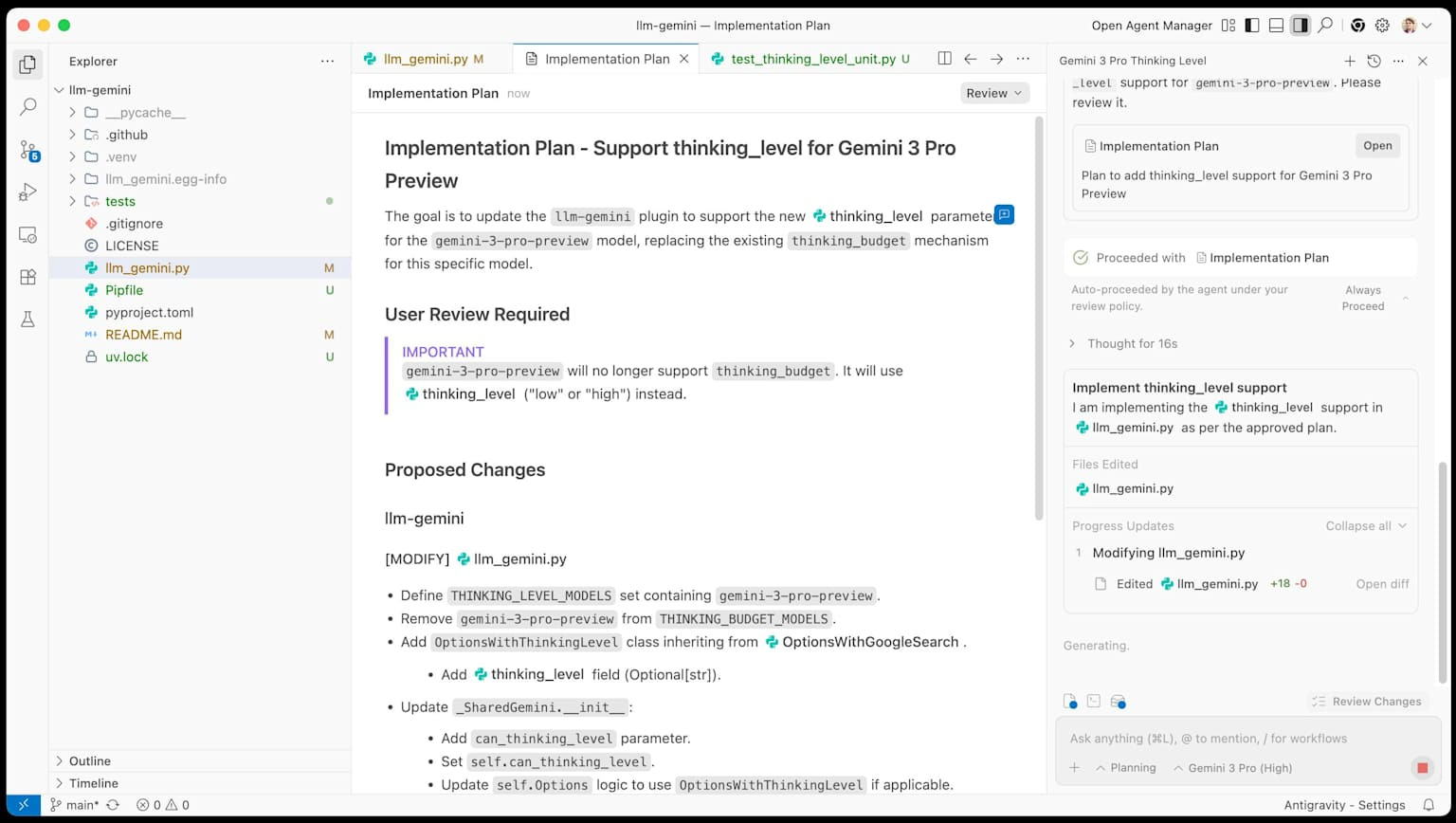
Antigravity is a VS Code–derived IDE built around Gemini 3.x Pro’s long context and multimodal capabilities.
For our SaaS, it’s ideal for:
Large-scale code navigation and refactors when the entire Next.js repo fits within Gemini’s ≈1M-token context window.
UI work where agents can compare app screenshots or DOM snapshots against Figma mocks and propose CSS/Tailwind updates.
Multi-agent orchestration through the Manager Surface, with ghost runtimes running tests and code in isolation.
Real constraints:
Effective context depends on your configuration and pricing tier; marketing numbers are upper bounds, and performance can degrade with very long contexts.
Long-context calls are slower and more expensive; you’ll lean on context caching to reuse repo snapshots.
5.2 Handling Agent Disagreement in Claude Code: Lead Architect Tie‑Breaker
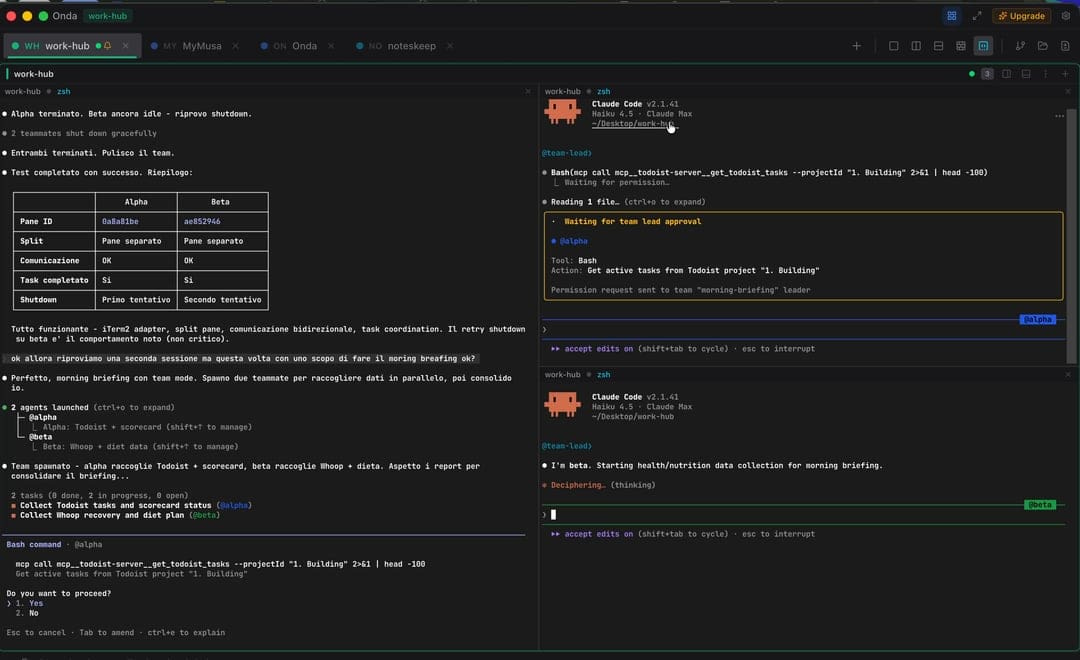
Claude Code’s Agent Teams work best when agents have clear roles: a Feature agent pushes for speed and capability, a Security agent pushes for safety and compliance, and the Lead Architect is responsible for reconciling the two. Without a procedure for disagreements, you get “consensus lock”: both agents are technically right, and the team stalls.
To avoid that, define a concrete tie‑breaker Skill or hook for the Lead Architect in Claude Code—for example, resolve_security_feature_conflict:
The Skill is only callable in the Lead Architect persona within the team.
When invoked, it must:
Summarize the Security agent’s objections (e.g., “direct DB write from a public endpoint,” “bypasses audit trail”).
Summarize the Feature agent’s intent (e.g., “reduce checkout steps from 4 to 2,” “support instant upgrades”).
Cross‑check both against the project Constitution (rules like “no direct writes to prod,” “all billing changes must be idempotent and auditable”).
The output must include:
A clear decision and rationale (“We keep the simpler UX but route writes through an internal billing service with logging; direct prod writes remain forbidden.”)
Updates to the team’s task list that encode the compromise (e.g., new tasks: “introduce internal billing service,” “add staged rollout + kill switch,” “add regression tests for downgrade path”).
In practice, when the Security and Feature agents in a Claude Code Agent Team propose incompatible plans, you don’t manually arbitrate every time; you explicitly call the Lead Architect’s tie‑breaker Skill. The Lead Architect produces a single, authoritative plan, adjusts the tasks, and only that reconciled plan moves forward.
6. Memory Architecture in Practice
For our SaaS, a useful memory hierarchy looks like this:
Session memory (context window)
Code and docs relevant to the current feature or incident.
Stored in Gemini / Claude context; ephemeral but high-value for local reasoning.
Semantic memory (vector/search)
User interviews, design docs, product decisions stored in a vector DB or search index via MCP.
State memory (databases)
Supabase Postgres for users, subscriptions, feature flags, etc., behind MCP tools.
Code structure memory
ASTs and call graphs to support safe refactors, made accessible via MCP or local tools.
Runtime memory
Logs and metrics (Datadog, Prometheus) accessible via MCP, especially for Path B.
Flight log memory
findings.mmd,.agent/history, and incident postmortems in Git—the “black box” of what agents attempted and why.
Each layer needs explicit permissions and interfaces: who can read/write, and via which tools.
7. Skills and Hooks: Encoding Capabilities
7.1 Antigravity Skills
In Antigravity, Skills are primarily execution-oriented modules:
Run a test suite and summarize.
Align a page’s layout with a Figma frame.
Refactor a group of files to a new pattern.
For our SaaS:
A Visual QA Skill might compare your dashboard UI against a Figma board and suggest Tailwind updates.
Use Antigravity Skills where you need high throughput and visual reasoning—but always with diff review and tests.
7.2 Claude Skills and Hooks
Claude Code hooks let you hook into lifecycle events in your coding workflow.
Examples for the SaaS:
TaskCompletedhook:Run tests and SAST for any code changes.
Block completion if coverage drops or migrations are missing.
TeammateIdlehook:Nudge teammates to pick up remaining tasks or refine their output.
Skills define “how to do X”; hooks define “when X runs and under which checks.”
8. MCP: Connecting to Databases, Logs, and Stripe
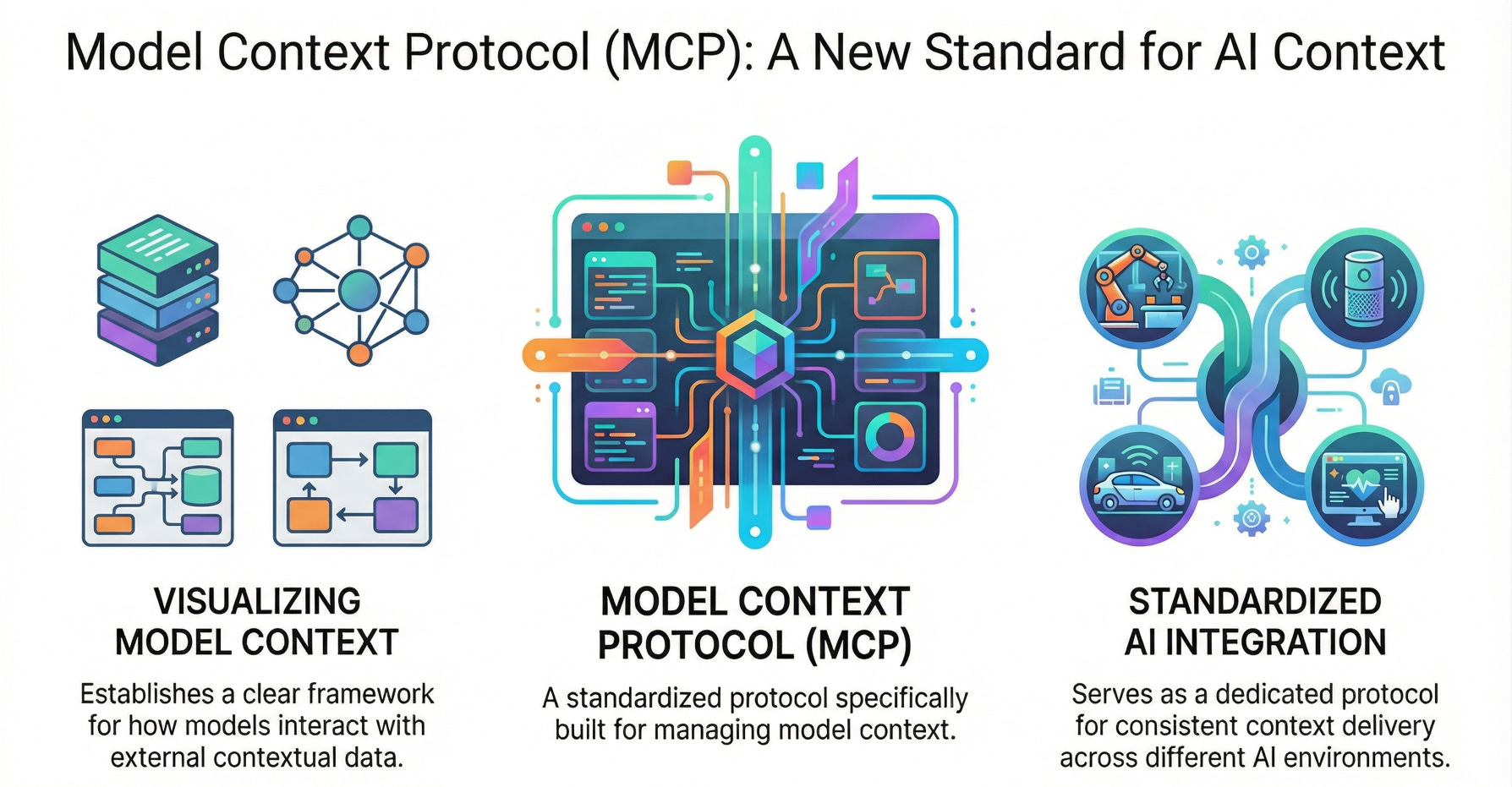
MCP is the standard protocol for connecting LLM hosts (Antigravity, Claude Code) to tools and data.
8.1 Core ideas
Hosts: IDEs and CLIs that run agents.
MCP clients: components in the host that speak MCP.
MCP servers: external services exposing tools like
query_db,search_logs, orget_invoice.
The November 2025 spec update adds:
CIMD (Client ID Metadata Documents) for standardized agent identity.
XAA (Cross App Access) for enterprise-managed authorization and policy-based access.
Better OAuth alignment and async tasks for long-running workflows.
8.2 For our SaaS
You might configure MCP servers for:
Supabase staging DB tools for reading/writing, and prod DB with carefully scoped access.
Stripe test-mode tools, and limited prod tools with explicit HITL.
Datadog logs and metrics.
Security posture:
Secrets live in MCP server configs or vaults, not in client configs.
Tools are scoped: most agents get read-only tools; a small set of guarded tools can mutate prod state, always under human approval.
MCP servers are managed like other critical infrastructure: infra-as-code, change control, and audit logging.
9. BLAST: A Zero-to-One Journey with Agents
BLAST (Blueprint, Link, Architect, Stylize, Trigger), originally proposed by Jack Roberts, is the build-time framework we’ll use for going from idea to working system.
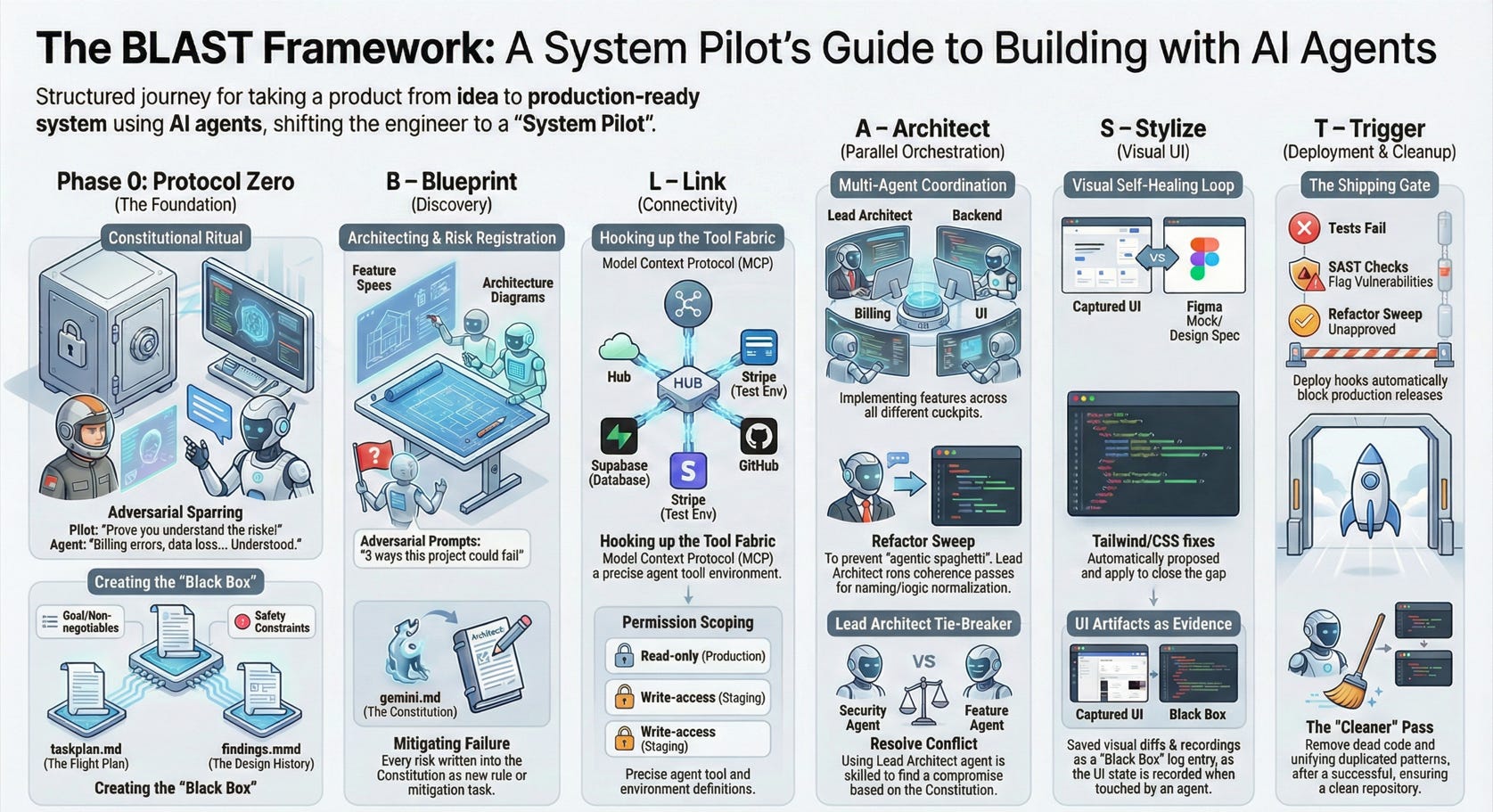
If you want to see BLAST taught end-to-end specifically in Antigravity, Jack’s 3+ hour “AntiGravity Masterclass” goes through his BLAST master prompt, Protocol Zero, and the end-to-end build process:
9.1 Phase 0 – Protocol Zero (Constitution)
Protocol Zero is the first flight hour between you (the System Pilot) and the agents. It’s not a command; it’s a ritual where you and the system argue your way toward a shared constitution.
9.1.1 What Protocol Zero produces
By the end of Protocol Zero you should have, in the repo:
gemini.md– ConstitutionScope and non‑goals.
Tech stack decisions.
Security constraints and non‑negotiables.
taskplan.md– Flight PlanPhases and milestones.
Dependencies and risks.
findings.mmd– Black BoxKey decisions and rejected plans.
Open questions and TODOs.
At the end of each BLAST phase (Blueprint, Link, Architect, Stylize, Trigger), append a short section to findings.mmd with key decisions, assumptions, and risks accepted or deferred. Over time this file becomes the Black Box of the system’s design‑time history.
These are not “docs the agent wrote once.” They are living artifacts that every later agent and SRE will read.
9.1.2 The Protocol Zero script (with adversarial sparring)
In your cockpit of choice (Claude Code or Antigravity), start a new session in the repo and give a single, explicit Protocol Zero prompt. For example:
Pilot:
“You are the System Pilot’s co‑architect for a new SaaS: Next.js + Tailwind + shadcn/ui frontend, Supabase Postgres, and Stripe billing.
Your job in this session is only to:
Propose
gemini.md(constitution),taskplan.md(phases), andfindings.mmd(flight log).Detect and list risks, especially around billing, migrations, and data loss.
Ask adversarial questions until you are confident enough to write the first drafts.
You are not allowed to write or modify application code in Protocol Zero.”
Now you spar. The critical move is to force the agent to prove it understands constraints and trade‑offs before you let it write anything.
A realistic sequence might look like this (condensed):
Agent:
“To confirm:
Primary goal is a multi‑tenant SaaS with authentication and recurring billing.
Tech stack is Next.js, Tailwind, shadcn/ui, Supabase, Stripe.
I may only create markdown and config files in this session, no application code.
Before drafting, I need to clarify:
What environments do we have (local, staging, prod) and which can agents touch?
Who is allowed to change database schema?
Are we targeting strict PCI scope minimization (Stripe‑only card handling)?”
You answer narrowly and sharply:
Pilot:
“1) Environments: local and staging only for agents. Prod is read‑only via MCP logs.
2) Agents may propose migrations, but only humans apply them to prod.
3) Yes, full PCI minimization. Cards live only in Stripe; database stores Stripe IDs and minimal metadata.”
Now push it into adversarial mode:
Pilot:
“List 5 concrete ways this project could fail in production, focusing on money and data. Be pessimistic.”Agent (example answer):
“Double‑charging users if webhook retry logic is wrong.
Accidentally deleting active subscriptions during a migration.
Leaking PII in logs the agents can read.
Prod DB schema drifting from staging.
Agents applying unreviewed migrations directly to prod.”
You then force protections into the constitution:
Pilot:
“Good. For each risk, propose a mitigation and write it as a rule that must go intogemini.md.
If any mitigation requires specific tooling (MCP servers, hooks, test gates), note that too.”
Only after this back‑and‑forth do you authorize file creation:
Pilot:
“Now draft:
gemini.mdwith: goals, non‑goals, environment rules, migration rules, billing safety rules.
taskplan.mdwith: phases (Auth → Billing → Admin → Observability), and explicit risk‑reduction tasks.
findings.mmdwith: the risks we enumerated and your rationale for the initial plan.
Show all three as diff‑style proposals; do not write to disk until I approve.”
You review the drafts, comment inline (“Too vague,” “Add explicit ‘no direct prod writes’ sentence”), and have the agent iterate. Only then do you let it create the files.
9.1.3 Updating the Black Box continuously
At the end of the session, you ask the agent to append a Protocol Zero entry to findings.mmd:
Date/time and participants (you + agent profile).
Final scope and non‑goals.
Risk list + mitigations chosen.
Any contentious decisions (e.g., “chose Supabase over RDS for speed; may revisit”).
Later, when an SRE runs an OODA loop during an incident, their first move is to feed findings.mmd back into the agent so it knows what the original builders were trying to do before suggesting remediations.
Protocol Zero is over when:
You have all three artifacts in Git.
The constitution clearly encodes environment and safety rules.
The agent has demonstrated it can reason about risks, not just echo specs.
9.2 B – Blueprint (Discovery)
Use Antigravity or Claude Code to:
Generate feature specs and initial architecture diagrams.
Run adversarial prompts: “List 5 ways this project can fail, emphasizing data loss, billing errors, and compliance risks.”
You then:
Write mitigations into
gemini.md, and create tasks for risk reduction (e.g., add Stripe webhook replay handling).
Exit criteria:
Spec and risk register stable enough to hand to Agent Teams.
9.3 L – Link (Connectivity)
Hook up MCP servers:
Supabase staging DB tools for reading/writing.
Stripe test mode tools.
GitHub tools for creating PRs or issues.
Record in gemini.md:
Which agents can call which tools in which environments.
Exit criteria:
Agents can read needed data from staging/test systems.
No prod write tools are active yet.
9.4 A – Architect (Parallel Orchestration)
Use both cockpits:
In Claude Code, create an Agent Team:
Lead: coordinates.
Backend teammate: implements APIs and migrations.
Billing teammate: Stripe integration and webhooks.
Testing teammate: tests and fixtures.
In Antigravity, run a UI agent focused on pages and components.
Hooks enforce that:
No task can complete without tests for new features.
DB changes require migrations and rollback paths.
Exit criteria:
PRs with clear diffs and messages for each major feature.
CI is green in staging (tests, lint, SAST).
Refactor Sweep as part of Architect
Parallel agents are great at making locally correct changes, but without a final pass they tend to produce “agentic spaghetti”: multiple patterns for the same concern, duplicated logic, and slightly different ways of doing the same thing.
To prevent this, every BLAST Architect cycle includes a dedicated Refactor agent (or human) in the Agent Team:
Their job is to run coherence passes over the parts of the repo that were touched in this phase (e.g., all billing modules, all auth flows).
They normalize naming, error‑handling, logging, and data‑access patterns, and flag any architectural drift.
They do not add new features; they only reshape what other agents produced so it fits the existing architecture and conventions.
This Refactor role is embodied in the Lead Architect persona inside the Agent Team. The Lead Architect can reject or re‑scope tasks that fragment patterns (“two different ways of doing billing,” “three HTTP clients”) and send them back to feature agents with explicit consolidation instructions.
9.5 S – Stylize (UI)
Stylize is where you stop guessing about UI quality and start treating it as a measurable, testable property. In Antigravity, this is powered by Artifacts—the screenshots, walkthroughs, and diffs that agents produce as evidence of what they did.
Instead of saying “I fixed the layout,” an agent in Antigravity can follow a Visual Self‑Healing loop:
Capture the current UI
The agent spins up the app and captures a screenshot or short browser recording of the relevant page or flow.
Compare against a design artifact
It compares that screenshot against a baseline: a Figma frame, a previous “golden” screenshot, or a design spec you attached to the task.
Misalignments (spacing, colors, broken layout, missing states) are called out in an Artifact, not buried in logs.
Propose and apply CSS/layout fixes
The agent edits Tailwind classes or CSS to close the gap, then reruns the flow and captures a new screenshot.
Code diffs and walkthrough notes explain what changed and why.
Regenerate the UI snapshot and diff
Antigravity attaches “before vs after” screenshots and, when relevant, a brief browser recording as Artifacts tied to the task.
You review the visual diff at a glance; if something still looks off, you leave comments directly on the Artifact and the agent iterates without restarting the whole task.
All of these—screenshots, recordings, walkthroughs, and diffs—are first‑class Artifacts that live alongside your code and findings.mmd, not ephemeral chat messages. They become part of the Black Box: when something breaks in production, SREs can see exactly what the UI looked like when the agent last touched it and what “fixed” meant at the time.
9.6 T – Trigger (Deployment) and Cleanup
Deploy to staging, then prod:
Add deploy hooks that:
Block deployment on failed tests or SAST.
Require explicit approval for prod.
Refactor Sweep as a shipping gate
In BLAST, refactoring is not a nice‑to‑have. It is a gate on whether a feature or milestone is done:
For each feature or phase, the Lead Architect (or human owner) must run a Refactor Sweep once Agent Teams have finished their tasks.
The Sweep produces a dedicated PR labeled REF-SWEEP that:
Consolidates patterns across all files touched in the phase.
Removes dead or duplicate code created by independent agents.
Aligns modules with the project’s architectural rules from gemini.md.
Rule: nothing ships until the latest REF-SWEEP PR for that milestone is reviewed and approved by the Lead Architect.
This makes “keep the codebase coherent” an explicit part of Trigger: shipping means tests are green, observability is in place, and the Refactor Sweep has passed.
Run a “Cleaner” agent pass:
Remove dead code and unify duplicated patterns.
Exit criteria:
Prod is live with monitored SLOs.
findings.mmddescribes main decisions and known tech debt.
10. OODA in Production: A More Realistic Incident Example
OODA (Observe, Orient, Decide, Act) is the run-time counterpart to BLAST: it governs how agents help you operate and heal systems already in production.
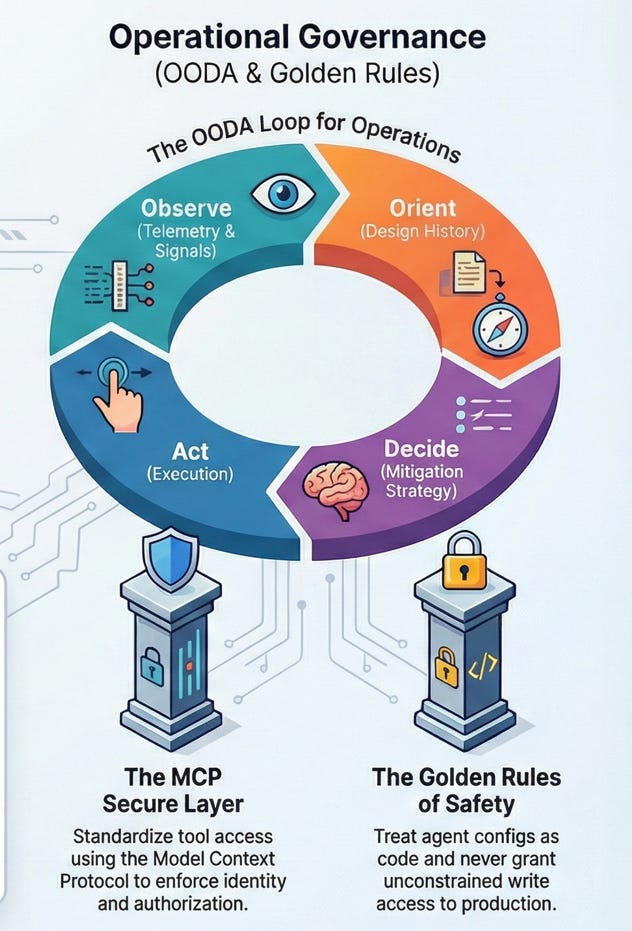
findings.mmd), decide on mitigation, act and learn10.1 Incident scenario
At 03:10, Datadog shows a spike in HTTP 500s for
/api/billing/update.Error budget for billing API is being burned.
The last deploy included a migration that modified
stripe_customer_idhandling.
10.2 Observe & Orient: Read the Black Box First
When something breaks in production, the SRE Pilot’s first job is to build context before anyone touches the system. That context comes from three places:
Runtime signals: logs, traces, metrics, and recent deploy history.
Current state: which features and migrations are live.
Design intent: why the system looks the way it does, captured in
findings.mmd.
Hooks and MCP wire this together in practice:
A PagerDuty alert triggers a Claude Code SRE Agent Team session.
Via MCP, the team pulls:
Datadog logs and traces.
Recent deploy logs and migration history.
A low‑cost model (Gemini Flash or similar) summarizes the logs:
“Error:
stripe_customer_idnull constraint violation increased sharply after deploybuild-2026.02.20-03:00.”
Now the SRE Pilot brings in design intent by loading findings.mmd and feeding it into the same agent session. Over the course of BLAST, the team has been appending notes there: key decisions, assumptions, and risks accepted or deferred at each phase (Blueprint, Link, Architect, Stylize, Trigger).
When the app crashes in prod, the first artifact the SRE Pilot feeds into the agent is findings.mmd, alongside the logs and deploy history. That lets the agent orient correctly:
It understands that a recent migration tightened a constraint but some users legitimately lack a
stripe_customer_id.It sees that rollback is non‑trivial because the migration added a new column used elsewhere.
It knows which trade‑offs were intentional (“tight constraint to prevent dirty data”) versus accidental.
Only after this Observe & Orient step—grounded in both telemetry and the Black Box—does the SRE Pilot let the agent move into Decide & Act to propose mitigations, rollbacks, or follow‑up refactors.
10.3 Decide & Act
Hooks prevent automatic rollback because a migration ran; the Constitution requires human approval for schema-affecting remediation.
The SRE Agent Team proposes:
Short-term mitigation:
Gate the new code path behind a feature flag.
Deploy a quick hotfix that falls back to a safe path for existing users.
Medium-term fix:
Backfill
stripe_customer_idfor affected rows by calling Stripe APIs.Add tests to cover users with missing IDs.
You:
Approve the short-term mitigation.
Require human review of the backfill plan and queries before agents run it via MCP.
Once mitigations are deployed and validated in logs, the incident resolves.
10.4 Learn
The SRE agents:
Summarize the incident in
findings.mmdwith cause, impact, remediation, and follow-ups.
You update guardrails:
Add a hook rule: any migration touching billing tables requires:
New tests.
A backfill strategy.
Human sign-off for rollout.
This is OODA as a continuous-improvement loop, not just a diagnosis tool.
11. Economics and Organizational Ownership
11.1 Cost sanity
Based on public price references for long-context models, a single feature end-to-end might:
Use roughly 200k–500k tokens across planning, coding, and testing with a mix of cheap and expensive models.
Cost in the low single‑digit to low double‑digit USD range, depending on the model mix and caching efficiency (for example, Gemini Pro or Claude Sonnet for heavy reasoning, cheaper models for observation and log work).
Basic controls:
Per‑project token budgets and alerts, so no team quietly burns thousands of dollars on background agents.
Model tiering: cheap models for logs, linting, and simple transforms; long-context, high‑reasoning models only for architectural work or complex code changes.
Pilot’s Note: Fuel Efficiency via Prompt Caching
Long‑context agents feel magical until you watch them “think” for 30–45 seconds over a million‑token codebase and then see the bill. Prompt/context caching is how you turn that first blast of thrust into a sustainable flight profile instead of a party trick.
Across major APIs in 2025–2026, cached input tokens are typically 75–90% cheaper than fresh input tokens and noticeably faster on cache hits. Anthropic’s prompt caching, for example, charges a small premium on the first cached request, then bills subsequent cached tokens at roughly 10% of normal input price and returns them much faster when the same prefix is reused. Google’s Gemini context caching uses a similar pattern: you pay once to store a large prompt and then reuse it at a reduced per‑token rate, with storage billed per hour.
For a System Pilot, that implies a different way of flying long-context agents:
Treat the first long-context call as pre‑flight.
Do one deliberate “load the whole repo + key docs” call per session, accepting that it will be slower and more expensive.
Use that call to build the agent’s mental map (code layout, core services, invariants), not to make trivial edits.
Stop constantly rewriting the prefix.
Keep a stable system prompt and repository snapshot across a series of turns so cache hits stay high instead of invalidating the cache every time you tweak phrasing.
When you need to change the “rules of the game” (for example, switching from build mode to incident mode), do it in deliberate chunks rather than micro‑edits.
Parallelize the waiting time.
In Claude Code Agent Teams or Antigravity’s manager view, spin up a background agent to run the initial repo analysis while you work in a smaller local context (writing tests, clarifying requirements, drafting
gemini.md).Once the pre‑flight pass completes, subsequent tasks can reuse the cached context, turning “45 seconds of thinking” into a one‑time cost for the whole session.
Rule of thumb for Pilots: if you’re going to ask an agent to reason over the same large context more than once, pay once, reuse many times. If you only need a single answer, don’t light up a million-token context when a smaller, targeted prompt will do.
11.2 Ownership and governance
For Path C readers, clarify who owns what:
Platform / Infra
Own MCP servers, identity integration (CIMD/XAA), network policies, and audit logging.
Treat MCP configs as infra-as-code.
System Pilots (per product / repo)
Own IDE/CLI configs (
.claude,.antigravity,.agent).Author and maintain Constitutions, Skills, project-level hooks, and BLAST/OODA patterns.
Collaborate with security, SRE, and GRC so guardrails align with org policies and compliance requirements.
SRE / Observability teams
Own incident hooks, OODA playbooks, and observability MCP tooling.
Define SLOs and error budgets that agents must respect.
This division lets you scale from “single System Pilot on a small SaaS” to “multiple System Pilots across teams, anchored by shared infra and governance.”
12. Closing: The System Pilot in 2026
In 2026, a System Pilot isn’t a magician with a clever prompt; they’re the engineer who:
Designs agent workflows that turn Antigravity, Claude Code, MCP, and hooks into a coherent system—not isolated toys.
Holds agents accountable through tests, diffs, policies, and budgets.
Keeps security, cost, and reliability front and center, even as more of the typing is delegated.
Agents can now read your entire codebase, refactor it, debug your incidents, and interact with your infrastructure. Without a System Pilot, that’s chaos. With one, it’s a new way of building and operating software that feels less like chatbots and more like flying with a capable—but carefully constrained—autopilot.
Appendix: Short Glossary
Antigravity – Google’s AI IDE integrating Gemini 3.x Pro with long context, multi-agent workflows, and ghost runtimes.
Agent Team – A Claude Code feature where one lead session coordinates multiple Claude teammates over a shared task list.
BLAST – A framework for going from zero to one (Blueprint, Link, Architect, Stylize, Trigger), originally articulated by Jack Roberts.
Constitution – A project-level document/config (e.g.,
gemini.md) that encodes constraints, goals, and guardrails for agents.CIMD – Client ID Metadata Documents in MCP, used to standardize how clients present identity and capabilities to servers.
Flight log – An ongoing record of what agents and humans did, why, and with what results (e.g.,
findings.mmd,.agent/history).Ghost runtime – An isolated, ephemeral environment (often a container) where agents can run code and tests without touching your local or prod systems.
HITL – Human in the loop; a human must approve or co-execute certain actions.
Hooks – Event-driven integrations in Claude Code that run commands or checks on lifecycle events (e.g.,
TaskCompleted).MCP (Model Context Protocol) – A protocol for connecting LLM hosts to tools and data through MCP servers.
OODA – Observe, Orient, Decide, Act; a loop used here for agentic incident response and continuous improvement.
Skills – Reusable capability definitions for agents (e.g., “run tests,” “align UI with Figma”) in Antigravity or Claude ecosystems.
XAA – Cross App Access in MCP; mechanisms for enterprise-managed authorization and policy-based access to MCP servers.